


Sway™
4.6202.00 Reviews
App Specs
- Version
- 1.0.35
- Updated On
- License
- Free
- Downloads
- 100,000+
- Developer
- Rocky Road Games
- Categories
- Trivia
- Platform
- Android
Screenshots



 Analysis by AppCompare
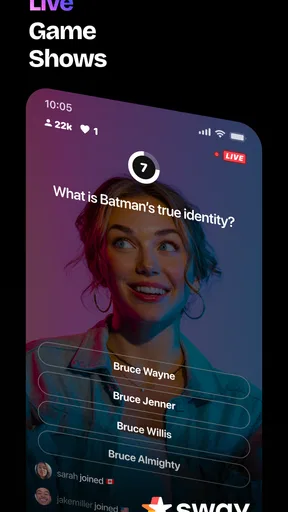
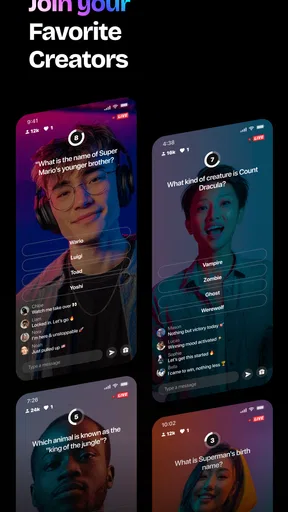
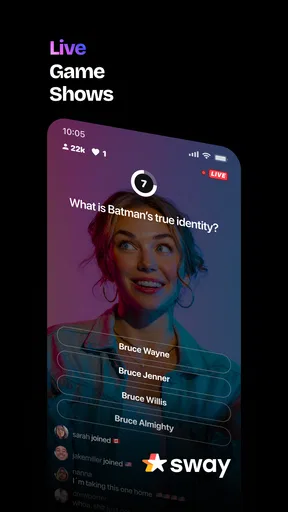
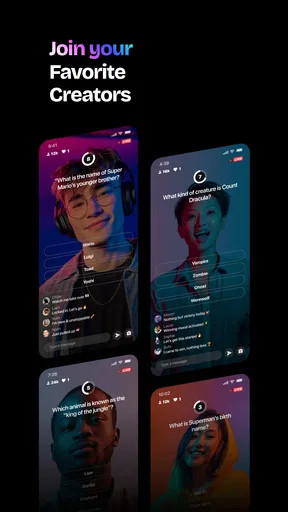
I’d start with a practical question before downloading Sway™: am I looking for a quick trivia round, or do I want something that feels more like joining a live show? That distinction matters here. Sway™ is a free trivia game from Rocky Road Games, built around the idea of bringing game-show-style play to a phone. I find that framing more useful than expecting a conventional quiz app where I simply answer a long list of questions at my own pace.
That live-show angle makes it easiest to enjoy when I can give the game my attention rather than squeeze it into a moment when I’m distracted. It suits a short break, a relaxed evening with friends nearby, or a commute when I have a stable connection and can focus. If I want a quiet, fully self-paced puzzle that I can pause whenever I like, a standard offline quiz may fit better. Sway™ is most appealing when I’m in the mood for the energy and shared feeling of a show.
What I check before settling into a round
I treat any live-style trivia game as a small routine: open it when I have a few uninterrupted minutes, make sure I’m ready to pay attention, and avoid starting when I’m about to walk into a meeting or lose my signal. That sounds obvious, but it changes the experience. Trivia rewards quick reading and a clear head; trying to play while switching between messages can turn a fun challenge into a frustrating scramble.
For a first session, I’d keep expectations modest and learn the rhythm before worrying about performance. Notice how quickly prompts arrive, how much time you have to think, and whether you enjoy answering under that pace. Those are personal fit questions, not settings I can assume the game provides. If the format clicks, you can build a repeatable habit around it; if it feels hurried, there’s no need to force it just because the presentation is lively.
It’s also worth being deliberate about spending. The game is free to download, while optional in-app purchases range from $1.99 to $49.99 per item. I’d begin with the free experience and decide whether anything extra genuinely improves the way I play before buying. In particular, I wouldn’t treat a purchase as a shortcut to better trivia: the part that makes a live quiz satisfying is still paying attention, recognizing what I know, and making a choice under pressure.
Getting the Most Out of Sway™
I get the most from a trivia session when I decide beforehand whether I’m playing to unwind or to challenge someone else; that small choice keeps the pace enjoyable instead of turning every answer into a test. I’d also use missed questions as prompts to explore a topic later, rather than expecting a quick game to replace deliberate study. A repeatable routine makes it easier to tell whether Sway™’s show-like format genuinely suits me.
Use a repeatable play pattern
My most reliable approach is to give each session a simple purpose. I might play one round to unwind, or use a session as a quick challenge with a friend who also enjoys trivia. Keeping that intention in mind helps me avoid drifting into an endless phone-checking habit. It also makes it easier to judge whether the game is serving me: did I enjoy the questions and pace, or was I mostly tapping while thinking about something else?
Worth Reading Before You Choose

EA SPORTS FC Mobile 26 Is a Bigger Football Game, but It Takes Time

Flipboard Shows What News Apps Must Do Beyond the Feed

Switching to Android Auto Means Rethinking Your Driving Routine

Google Calendar Makes a Crowded Week Easier to Manage

Ludo King Makes the Most of the Minutes Between Plans

Baby Panda World Brings Quick Play to Modern Phones, but Its Game Library Feels Busy
If you’re playing around other people, agree on the mood beforehand. A friendly comparison of answers can make a trivia session more social, but someone who wants a quiet solo game may prefer to play privately rather than turn every result into a competition. I’d also keep the phone’s sound and surroundings in mind. A show-like experience can be less enjoyable in a noisy place or somewhere I need to stay discreet, so a calmer setting is often the better choice.
Where it fits among trivia games
Compared with the usual trivia alternatives, Sway™ sounds best for someone drawn to a hosted, event-like atmosphere rather than a static bank of questions. A conventional quiz app can be the better option when I want to set my own pace, revisit material, or play without depending on a live-feeling session. A general social app may offer broader conversation, but it won’t necessarily give me the same focused trivia activity. The trade-off is simple: the more I value immediacy and show energy, the more attractive Sway™ becomes; the more I value control and quiet repetition, the more a standard quiz is likely to suit me.
That distinction is useful when choosing who to invite. Someone who enjoys quick decisions and playful competition may be ready to jump in, while a trivia fan who prefers carefully researching each answer might find the pace less satisfying. I wouldn’t use it as a replacement for a study tool either. It can make general knowledge more entertaining, but a game-show format is not the same as a structured course or a dependable way to master a subject.
Who should give it a try—and who may prefer something else
I’d recommend trying Sway™ if the thought of answering trivia in a live-show setting sounds more fun than working through questions alone. It may also suit a household looking for a low-effort activity: after dinner, one person can suggest a round, everyone can put their phones aside between turns if the format allows, and the group can enjoy the tension of trying to recall an answer. That last detail is a general way to make phone trivia more social, not a claim about a special group mode inside the game.
I’d steer away from it if I needed a game that works reliably without internet, if I disliked time pressure, or if I wanted a completely private experience with no social atmosphere. Those preferences are not flaws; they simply point toward a different kind of trivia app. Likewise, if I’m looking for deep customization, a broad subject catalogue, or detailed learning progress, I’d check that those needs are met before making Sway™ my main quiz game rather than assuming the live-show concept includes them.
Small habits that make sessions smoother
A useful trick with any quick-response trivia is to read the whole prompt before committing. Under pressure, it’s easy to latch onto a familiar word and answer the question you expected instead of the one on screen. I also try to separate confidence from speed: if I know the answer, I respond decisively; if I’m unsure, I take the moment available rather than changing my mind repeatedly. That won’t guarantee a better result, but it keeps the experience more enjoyable and gives me a clearer sense of what I actually know.
After a session, I’d remember the kinds of questions that caught me off guard instead of obsessing over a score. A missed answer can be a prompt to look something up later, but I wouldn’t assume the game itself provides a study history or a review mode. This small habit lets trivia stay light while still giving me something useful to take away. It also helps distinguish an entertaining round from a format I’d want to use for deliberate learning.
Practical details and honest limits
Sway™ is rated Everyone, has reached over 100,000 installs, and holds an average rating of 4.6 from around 2,800 ratings. It was released on May 23, 2025, and version 1.0.35 requires Android 10 or later. I’d check that operating-system requirement before installing, especially on an older phone. The rating and audience figures suggest that plenty of people have tried it, but they can’t tell me whether I’ll enjoy the pacing; my first session is still the most useful test of fit.
The main limitation I’d keep in mind is that a live-show concept naturally asks more of my attention than a slow quiz. Timing, connection, and the environment can all affect whether a session feels exciting or inconvenient. I also wouldn’t assume every round is ideal for every player: someone who wants unlimited time to reason through questions may prefer a self-paced alternative, while someone who likes a quick burst of trivia may find that same pressure energizing.
My verdict after weighing the trade-offs
Sway™ is a promising pick when I want trivia to feel like an occasion rather than a worksheet. I’d start with the free version, try it in a quiet moment, and pay attention to whether the show-like pace makes me smile or makes me feel rushed. If it suits me, setting aside a regular short window to play is a better habit than opening it at random whenever I’m already distracted. If it doesn’t, a traditional quiz game is an easy and sensible alternative.
For anyone curious, it’s available free, with optional purchases priced from $1.99 to $49.99 per item. Rocky Road Games developed it, and the latest listed version is 1.0.35. My recommendation is straightforward: give it a try if you enjoy quick trivia and the idea of a phone-based show, but choose a self-paced quiz if flexibility, offline play, or deliberate study matters more to you.
If you’re on the hunt for a social networking app that lets you dive into a world of creativity and connection, let me introduce you to Sway™. This app is not just another social platform; it's a vibrant ecosystem where art, music, and performance collide. I’ve spent the last few days immersed in its features, and I’m here to give you the lowdown on what makes Sway™ tick.
Discovering Your Creative Groove
The first thing that struck me about Sway™ is its intuitive interface. From the moment you log in, you’re greeted with a sleek design that’s both user-friendly and visually appealing. Navigating through the app is a breeze, allowing you to focus on what really matters: unleashing your creativity.
Creating and Sharing Content
At its core, Sway™ is about creating and sharing. Whether you're into music, art, dance, or any other form of expression, the app provides a platform to showcase your talents. The in-app tools are robust yet easy to use, catering to both beginners and seasoned creators. You can record, edit, and enhance your content right within the app, making it a one-stop-shop for all your creative needs.
Once your masterpiece is ready, sharing it with the Sway™ community is as simple as a tap. The app supports seamless sharing across other social media platforms too, so your creations can reach an even wider audience.
Connecting with a Like-Minded Community
One of the standout features of Sway™ is its vibrant community. The app fosters a sense of belonging, where users can connect over shared interests and passions. You can follow, like, and comment on others’ creations, sparking conversations and collaborations. It’s not just about broadcasting your work; it’s about engaging with others and being inspired by their creativity.
Events and Challenges
To keep things fresh and exciting, Sway™ hosts various events and challenges. These are themed competitions that encourage users to push their creative boundaries. Participating in these challenges is not only fun but also a great way to gain visibility and grow your follower base. Plus, who doesn’t love a bit of friendly competition?
Getting the Most Out of Sway™
To truly make the most of Sway™, I recommend exploring its diverse features. Dive into the app’s tutorials and tips section, which is packed with handy guides to help you refine your skills. And don’t forget to check out the trending section for a dose of inspiration and to see what’s currently capturing the community’s attention.
The app also offers premium features for those looking to take their experience to the next level. While the basic version is packed with plenty of tools, upgrading gives you access to exclusive content and advanced editing features.
The Final Word
In a world brimming with social apps, Sway™ stands out by offering a space where creativity reigns supreme. It’s more than just an app; it’s a community of artists, musicians, and dreamers sharing their passions and inspiring each other. Whether you’re a creator looking to showcase your work or someone who simply enjoys consuming creative content, Sway™ has something for everyone.
So, if you’re ready to join a thriving community and let your creativity shine, give Sway™ a try. Who knows? You might just find your new favorite way to express yourself!
Pros
- Intuitive design makes navigation easy.
- Extensive music library for creativity.
- Real-time collaboration with friends.
- User-friendly editing tools available.
- Regular updates enhance experience.
Cons
- Limited offline functionality.
- Occasional app crashes reported.
- Lack of advanced editing features.
- In-app purchases can be costly.
- Requires stable internet connection.
FAQs for Sway™
What is Sway™ and what does it offer?
Sway™ is a dynamic app designed for creating visually stunning presentations and stories. It offers a range of templates, design options, and multimedia integration to help users craft compelling narratives. Whether you're a student, professional, or creative, Sway™ provides an intuitive platform to enhance your presentations with ease.
Is Sway™ available for both Android and iOS devices?
Yes, Sway™ is available on both Android and iOS platforms, ensuring a seamless experience across different devices. Users can download it from the Google Play Store or the Apple App Store, allowing for flexible access to its features no matter what operating system they use.
Does Sway™ require an internet connection to function?
While Sway™ primarily operates online to leverage cloud-based features, it does offer offline capabilities for editing existing projects. However, an internet connection is necessary for accessing certain features, collaborating in real-time, and syncing your creations across devices.
Are there any costs associated with using Sway™?
Sway™ offers a free version with basic features, but there is also a premium subscription available. The premium version unlocks advanced functionalities, additional design templates, and enhanced collaboration tools. Users can choose the option that best fits their needs and budget.
How user-friendly is Sway™ for beginners?
Sway™ is highly user-friendly, making it ideal for beginners. It features an intuitive interface with drag-and-drop functionality, along with tutorials and guides to help users get started. Even those with little to no design experience can create professional-looking presentations quickly and easily.


